Retail POS & ERP
The complete POS & ERP for shops, supermarkets, pharmacies and restaurants.
Register in a few minutes and use the full system free for 14 days.
- Point of sale (POS)
- Camera barcode scanning
- Split payment
56features
8modules
14 daysfree demo
Sell at the counter, manage stock in every branch, buy from suppliers, track customer dues and keep full accounts — in one system that works on a computer, tablet or phone, even when the internet drops.
Benefits
What changes in your business from the first day.
Shorter queues at the counter
Scan with the camera, take split payments and print automatically — a sale takes seconds.
Every payment in one bill
Credit and debit cards, cash and bank transfer in the same invoice, with the cash till always balanced.
Stock you can trust
Stock by location, transfers, counts, expiry countdowns and serial/IMEI tracking.
Dues under control
Sell on credit and see exactly who owes what, and for how long, with dues aging.
Accounts without a separate software
Chart of accounts, journals, vouchers, salaries, expenses and financial statements built in.
All branches from one screen
Branch-wise prices, stock and performance, with alerts on the dashboard.
Built for real-world retail
What shops, pharmacies and restaurants need every day is built in — not added later.
Cards, cash and bank in one bill
Split one bill across credit and debit cards, cash and bank transfer — the way customers pay worldwide.
Credit sales & store accounts
Record sales on account, collect in parts and follow up with dues aging.
Keeps selling offline
Internet down? The counter keeps billing.
Bluetooth receipt printing
Print from an Android phone to a Bluetooth thermal printer via RawBT or directly.
Camera barcode scanning
Start with the phone or tablet camera — no extra scanner needed on day one.
Pharmacies, phone shops & restaurants
Expiry dates with first-expiry-first-out selling, IMEI and warranty checks, tables, kitchen screen and KOT.
Take payment the way your customer pays
Split one bill across credit and debit cards, cash and bank transfer. Offers, coupons, gift cards and customer points apply at the counter.
- Split payment in one invoice
- Discounts, coupons & gift cards
- Credit sales
- Cash till per shift
Every branch's stock, live
See stock by location, move it between branches and warehouses, and count or adjust with a record of why.
- Stock transfer between locations
- Branch-based pricing
- Expiry countdown
- Serial / IMEI tracking
Ready for supershops
Scan fast at several counters at once, run offers and promotions, reward regulars with points and keep every shelf's stock and expiry in check.
- Multiple counters
- Promotions & coupons
- Customer points
- Category, brand & unit
Ready for clothing & fashion stores
Every size and colour is its own variant with its own stock and barcode label. Exchanges are quick, and branches can move stock between them.
- Size & colour variations
- Barcode labels
- Returns & exchange
- Seasonal offers
Expiry under control — ready for pharmacies
Every product carries its expiry date with a countdown, and the stock that expires first is sold first. Warranty periods are checked straight from the sale.
- First expiry, first out (FEFO)
- Expiry countdown & alerts
- Warranty check
- Serial / IMEI tracking
Ready for restaurants
Seat tables, send orders to the kitchen screen with a KOT, and track ingredients with recipes.
- Tables
- Kitchen screen
- KOT
- Recipes
Ready for every kind of business
Electronics and mobile shops, cosmetics, hardware, books and stationery, wholesale — set up categories, units and prices your way and import your catalogue from CSV.
- Serial / IMEI & warranty
- Units & warehouses
- CSV import / export
- Branch-based pricing
Know your numbers every day
A dashboard with alerts, branch performance, 25+ reports and full financial statements.
- Report center (25+ reports)
- Branch performance
- Dashboard & alerts
- Financial statements
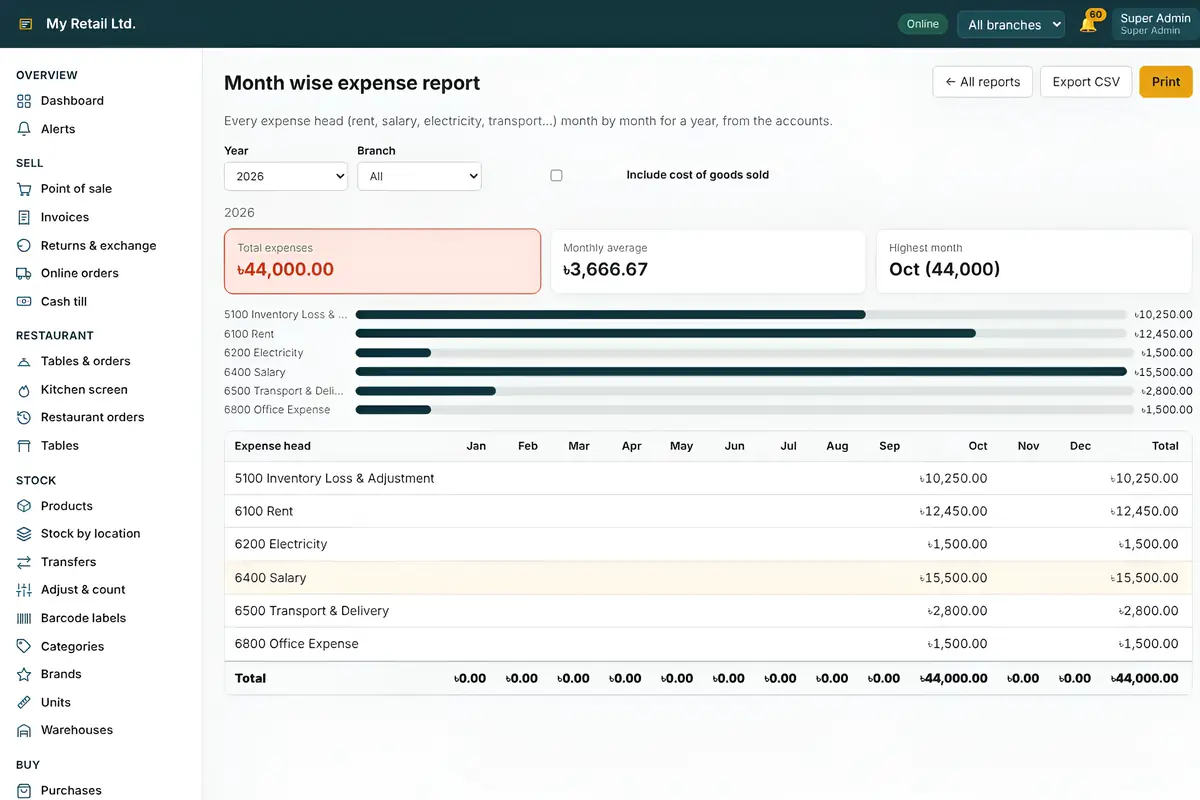
Illustrative screens
A look inside
Actual screens from the product.
Software features
56 features across 8 modules — everything in one system.
Sales & checkout
14Point of sale (POS)
Fast, touch-friendly billing at the counter.
Camera barcode scanning
Scan products with a phone, tablet or laptop camera.
Split payment
Credit and debit cards, cash and bank transfer in one bill.
Discounts, coupons, promotions & gift cards
Run offers and sell or redeem gift cards.
Customer points
Reward repeat customers with loyalty points.
Credit sales
Sell on credit and collect later.
Offline selling
Keep billing when the internet is down.
Sales invoice
Professional invoices for every sale.
Invoices
Search, reprint and review all invoices.
Returns & exchange
Handle returns and exchanges with stock updated.
Online orders
Receive and process online orders.
Cash till
Open, close and balance the cash drawer per shift.
Warranty check
Warranty period saved with the sale and checked in seconds.
Restaurant mode
Tables, kitchen screen, KOT and recipes.
Products & inventory
12Products & variations
Sizes, colours and other variants per product.
Branch-based pricing
Set different prices for each branch.
Expiry dates & countdown
See what expires soon before it's too late.
First expiry, first out (FEFO)
Stock that expires first is sold first, automatically.
Pharmacy ready
Expiry tracking, FEFO and alerts make it a fit for pharmacies.
Serial / IMEI numbers
Track each unit by serial or IMEI.
Stock by location
Live stock for every branch and warehouse.
Stock transfer
Move stock between locations with a record.
Adjust & count
Stock counts and adjustments with reasons.
Barcode labels
Design and print barcode labels.
Category, brand, unit & warehouse
Organise the catalogue your way.
CSV import / export
Bring in products and data in bulk.
Purchases, suppliers & customers
5Purchase orders & goods receiving
Order from suppliers and receive against the order.
Direct purchase
Record quick purchases without an order.
Suppliers & supplier payments
Supplier balances and payments in one place.
Customers
Customer profiles and purchase history.
Dues & aging
Who owes what, and for how long.
Accounts & finance
9Financial statements
Profit & loss, balance sheet and more.
Chart of accounts & journals
Double-entry accounting built in.
Bank accounts
Track balances of every bank account.
Office expense
Record day-to-day expenses.
Fixed expense
Rent, bills and other recurring costs.
Payment voucher
Vouchers for every payment made.
Salary payment
Pay staff and keep the record.
Cash transfer
Move cash between tills and branches.
Bank ↔ Cash
Deposits and withdrawals in the books.
Reports & analytics
3Report center (25+ reports)
Sales, stock, purchase, dues and finance reports.
Branch performance & analytics
Compare branches and spot trends.
Dashboard & alerts
Today's numbers and alerts at a glance.
Staff & HR
3Employees, attendance & leave
Staff records, daily attendance and leave.
Targets & commission
Sales targets and commission for staff.
Users, roles & permissions
Give each person exactly the access they need.
Printing
3Receipt & A4 invoice printing
Thermal receipts or full-page invoices.
Auto print
Print the receipt the moment a sale completes.
Bluetooth printing (RawBT / direct)
Print from a phone to a Bluetooth printer.
Branches, security & platform
7Multiple branches & counters
Run many counters across many branches.
Multi-company & subscription
Several companies under one account.
Trial & licence management
Trial period and licence status in the app.
Audit log
See who changed what, and when.
Two-step login
An extra code at sign-in protects accounts.
PWA (install as an app, works offline)
Install on any device and keep working offline.
Dark mode
Easy on the eyes during long shifts.
Why choose Retail POS & ERP?
Start 14-day free demoOne system instead of five
POS, inventory, purchasing, accounts and HR share the same data — no double entry.
Try it free for 14 days
Register, set up your shop and use the full system before you decide.
Install it like an app
Works in the browser and installs as an app (PWA) on phones, tablets and computers.
Your data stays protected
Role-based permissions, two-step login and a full audit log of who changed what.
Grows with your business
Add counters, branches and even companies on the same account when you expand.
A local team behind it
Onboarding, CSV data import and support from the Infosoftix team.
Pricing
Basic
For a single shop getting started.
$100/year
- 1 branch
- 1 user
- Billed yearly
- Starts with a 14-day free demo
Standard
For growing shops with a few branches.
$200/year
- 3 branches
- 10 users
- Billed yearly
- Starts with a 14-day free demo
Pro
For multi-branch retailers.
$600/year
- 10 branches
- 20 users
- Billed yearly
- Starts with a 14-day free demo
Premium
For large retail chains.
$1,000/year
- 20 branches
- 30 users
- Billed yearly
- Starts with a 14-day free demo
How does the 14-day free demo work?
Click "Start 14-day free demo", register your shop and use the full system for 14 days. After that, choose a plan to continue.
Can I keep selling when the internet is down?
Yes. Offline selling lets the counter keep billing without an internet connection.
Can a customer split one bill across payment methods?
Yes. Split payment records credit and debit cards, cash and bank transfers in the same bill, so your cash till and accounts stay correct.
Do I need to buy a barcode scanner?
Not to get started. You can scan barcodes with the camera of a phone, tablet or laptop, and print your own barcode labels from the system.
Which printers can I use?
Thermal receipt printers and regular A4 printers. Receipts can print automatically after each sale, and you can print from an Android phone to a Bluetooth printer through RawBT or directly.
I have several branches. Will it work for me?
Yes. Run multiple branches and counters, set branch-based prices, see stock by location, transfer stock and compare branch performance.
Can I use it in a restaurant?
Yes. Restaurant mode includes tables, a kitchen screen, KOT (kitchen order tickets) and recipes.
Can I use it in a pharmacy?
Yes. Every product carries its expiry date with a countdown and alerts, and stock that expires first is sold first (FEFO), so medicines don't sit on the shelf past their date.
I run a mobile or electronics shop. Can I track IMEI and warranty?
Yes. Track every unit by serial or IMEI number and check warranty status from the sale.
How do I bring in my existing products?
Use CSV import to add products in bulk. Our team can help with the first import during onboarding.
Does it handle accounts, or do I need another software?
No other software needed. It includes a chart of accounts, journals, bank and cash accounts, expenses, vouchers, salary payments and financial statements.
Is my data secure? Can I limit what staff can see?
Yes. Set roles and permissions for each user, turn on two-step login, and review every change in the audit log.
How much does it cost?
Yearly packages start at $100 for 1 branch and 1 user: Basic $100, Standard $200 (3 branches, 10 users), Pro $600 (10 branches, 20 users) and Premium $1000 (20 branches, 30 users). Every package starts with the 14-day free demo.